1. 오늘 학습 키워드
풍선을 지켜라 게임 만들기!!!
2. 오늘 학습 한 내용을 나만의 언어로 정리하기
[챕터. 1]
1) Unity 기본 구성 활용(씬, 하이라키, 프로젝트, 인스펙터, 게임화면 구성 변경, 윈도우 구성 변경, 오브젝트 추가 등)을
좀 더 구체적으로. 애니메이션 만들기도 더더욱 심화로 들어가기.
2) 깜빡거리는 풍선의 애니메이션 + 쉴드의 움직임 구현해보기!
-Camera.main.ScreenToWorldPoint(Input.mousePosition); =>스크린상 마우스 위치를 월드좌표로 변경!
=>뭐지. 이미 복습이나 뭘 해서 그런가. 생각보다 쉬웠다.
using System.Collections;
using System.Collections.Generic;
using UnityEngine;

public class Shield : MonoBehaviour
{
    // Start is called before the first frame update
    void Start()
    {

    }

    // Update is called once per frame
    void Update()
    {
        Vector2 mousePos = Camera.main.ScreenToWorldPoint(Input.mousePosition);
        transform.position = mousePos;
    }
}
Shield 코드
[챕터. 2]
1) 콜라이더와 리지드바디로 중력과 충돌 구현 복습!!
- 추락하는 대상에 리지드 바디!
- 추락하여 충돌하는 물체. 충돌 당하는 물체. 모두 콜라이더 세팅!(원이면 써클, 사각이면 스퀘어로 당연하게!)
2) 랜덤범위 지정 생성하기
- Random.Range(0f,0f) 로 임의 위치를 함수에 할당. 그리고 transform.position으로 할당
- 동일한 함수로 임의 스케일 형성. transform.localscale로 크기에 할당
3) 프리팹화와 게임매니저 제작!
using System.Collections;
using System.Collections.Generic;
using UnityEngine;

public class GameManager : MonoBehaviour
{

    public GameObject squarePrefab;
    // Start is called before the first frame update
    void Start()
    {
        InvokeRepeating("MakeSquare", 0f, 1f);
    }

    // Update is called once per frame
    void Update()
    {

    }

    void MakeSquare()
    {
        Instantiate(squarePrefab);
    }
}
왔는가 GameManager. 지긋지긋한 놈....
[챕터. 3]
1) 시간을 움직이게 하는 Time.deltaTime()
- Debug_log(Time)으로 시간이 추가되는 것 확인!
- 당연하지만. UI활용 로직을 추가하고, Timetxt를 넣는 공간도 만들어줘야지.
using System.Collections;
using System.Collections.Generic;
using UnityEngine;
using UnityEngine.UI;

public class GameManager : MonoBehaviour
{

    public GameObject squarePrefab;

    public Text timeTxt;

    float time = 0.0f;

    // Start is called before the first frame update
    void Start()
    {
        InvokeRepeating("MakeSquare", 0f, 1f);
    }

    // Update is called once per frame
    void Update()
    {
        time += Time.deltaTime;
        timeTxt.text = time.ToString("N2");
    }

    void MakeSquare()
    {
        Instantiate(squarePrefab);
    }
}
GameManager는 사실상 만능이고. 이런 규칙개체는 중요하다는 걸 새삼 느끼는 중
[챕터. 4]
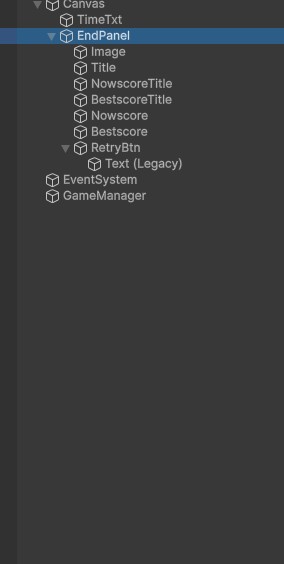
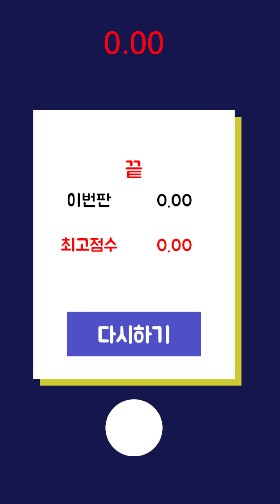
1) 엔드판넬 만들기!!!
- Endpannel을 만들고, 안에 이미지를 만들고 쉐도우 효과도 주기!!
- 쉐도우 컴퍼넌트!!! 아주 유용!
2) 폰트 와 캔버스의 빈오브젝트에 글자와 이미지 넣는것 연습!
3) 고대하던 복습! 리트라이 버튼 만들기!
 |
 |
 |
게임진행을 해보았다.
[챕터. 5]
1) 게임종료 로직 만들기!!!
-싱글톤 만들기! public static GameManger Instance;
-인스턴스가 null이면 게임매니저를 인스턴스로 한다.
2) oncollisionenter2D 함수를 만들어서. 충돌시 조건을 발동시키는 함수 불러오기!
- 게임매니저와 스퀘어 함수에 적용!
3) 스타트와 엔드를 지우고 오로지 Retry함수만 가지는, 리트라이버튼 스크립트! (씬매니저!)
using System.Collections;
using System.Collections.Generic;
using UnityEngine;
using UnityEngine.SceneManagement;

public class RetryButton : MonoBehaviour
{
    public void Retry()
    {
        SceneManager.LoadScene("MainScene");
    }
}
using System.Collections;
using System.Collections.Generic;
using UnityEngine;
using UnityEngine.UI;
public class GameManager : MonoBehaviour
{
public static GameManager instance;
public GameObject Endpanel;
private void Awake()
{
if (instance == null)
{
instance = this;
}
Application.targetFrameRate = 60;
}
public GameObject squarePrefab;
public Text timeTxt;
public Text nowscore;
bool isPlay = true;
float time = 0.0f;
// Start is called before the first frame update
void Start()
{
Time.timeScale = 1.0f;
InvokeRepeating("MakeSquare", 0f, 1f);
}
// Update is called once per frame
void Update()
{
if (isPlay)
{
time += Time.deltaTime;
timeTxt.text = time.ToString("N2");
}
}
void MakeSquare()
{
Instantiate(squarePrefab);
}
public void GameOver()
{
isPlay = false;
Time.timeScale = 0.0f;
nowscore.text = time.ToString("N2");
Endpanel.SetActive(true);
}
}Retry함수를 위한 스크립트와 Gamemanager 스크립트
[챕터. 6]
1) 최고점수를 기억하게 하기!!
-유니티의 편의 기능! Playerprefs 최고 점수를 기억하게 한다!
-이에 따라, 최고점수를 아래의 코드처럼 갱신하게 해줘야지.
2) 항상 배우면서도 중요한지 모르지만. 문자열값. 숫자값이 여러개 쓰일땐. 여러 문제 개선을 위해 변수 지정!
        //최고점수가 있다면
        if(PlayerPrefs.HasKey(key))
        {
            // 최고점수가 현재점수보다 작다면
            float best = PlayerPrefs.GetFloat(key);
            if (best < time)
            {
                // 현재점수를 저장한다.
                PlayerPrefs.SetFloat(key, time);
                bestscore.text = time.ToString("N2");
            }
            // 최고점수가 현재점수보다 크다면
            else
            {                 // 최고점수를 불러온다.
                bestscore.text = best.ToString("N2");
            }
        }
        //최고점수가 없다면
        else
        {
            // 현재점수를 저장한다.
            PlayerPrefs.SetFloat(key, time);
            bestscore.text = time.ToString("N2");
        }
어려운 듯 하지만. 생각보다 간단한 로직! 주석을 통해 보니 쉽게 이해가 됨!
[챕터. 7]
1) 애니메이션 추가하기!
- isDie 애니메이션을 추가. 색이 붉어지며 커지게!
- 게임매니저에 isDie가 되면 ballonDie로 이어지는 애니메이션을 실행시키게 함. 그런데...안되네?
2) 사유는 타임 스케일이 0이 되기 때문!
- Invoke("Timestop", 0.5f); 로 따로 빼둔 타임스케일을 0으로 만드는 기능을 0.5f정도 지연시켜야함!

using System.Collections;
using System.Collections.Generic;
using UnityEngine;
using UnityEngine.UI;

public class GameManager : MonoBehaviour
{
    public static GameManager instance;

    public GameObject Endpanel;

    private void Awake()
    {
        if (instance == null)
        {
            instance = this;
        }
        Application.targetFrameRate = 60;
    }


    public GameObject squarePrefab;

    public Text timeTxt;
    public Text nowscore;
    public Text bestscore;

    public Animator anim;

    bool isPlay = true;

    float time = 0.0f;

    string key = "BestScore";

    // Start is called before the first frame update
    void Start()
    {
        Time.timeScale = 1.0f;
        InvokeRepeating("MakeSquare", 0f, 1f);
    }

    // Update is called once per frame
    void Update()
    {
        if (isPlay)
        {
            time += Time.deltaTime;
            timeTxt.text = time.ToString("N2");
        }

    }

    void MakeSquare()
    {
        Instantiate(squarePrefab);
    }

    public void GameOver()
    {
        isPlay = false;
        anim.SetBool("isDie",true);
        Invoke("Timestop", 0.5f);
        nowscore.text = time.ToString("N2");

        //최고점수가 있다면
        if(PlayerPrefs.HasKey(key))
        {
            // 최고점수가 현재점수보다 작다면
            float best = PlayerPrefs.GetFloat(key);
            if (best < time)
            {
                // 현재점수를 저장한다.
                PlayerPrefs.SetFloat(key, time);
                bestscore.text = time.ToString("N2");
            }
            // 최고점수가 현재점수보다 크다면
            else
            {                 // 최고점수를 불러온다.
                bestscore.text = best.ToString("N2");
            }
        }
        //최고점수가 없다면
        else
        {
            // 현재점수를 저장한다.
            PlayerPrefs.SetFloat(key, time);
            bestscore.text = time.ToString("N2");
        }


        Endpanel.SetActive(true);
    }


    void Timestop()
    {
        Time.timeScale = 0.0f;
    }
}
애니메이션을 불러오기 위해. TimeScale을 뒤로 미루고, ani.setBool("isDie")를 트루로 살려주었다.
3. 학습하며 겪었던 문제점 & 에러
- 문제&에러에 대한 정의
1)단순한 것을 빙빙 돌아가는 경우가 있었다. 일정 좌표값에 도달하면 삭제하게 하면 되는데 빙글빙글 돌아서, 새로운 콜라이더 오브젝트를 만들고. 맵 아래에 배치. 거기 충돌하면 삭제되게 한것.
- 내가 한 시도
1) 제출후에야 힌트를 보고 알게 됨. 다시 수정하여. 제대로 제출
- 새롭게 알게 된 점
1) 유니티의 기본기반으로 이정도의 개발이 가능하다는게 신선하고 충격적.
2) 여기에 스테이지 개념과, 판넬을 여러개, 버튼을 여러개 넣을 수 있다면. 과장이 아니라 정말 출시도 가능하다.
4. 내일 학습 할 것은 무엇인지
- 내일은 C#을 공부하고, 가능하다면 빗물르탄과 풍선게임을 복습해보고자 한다.
'팀스파르타 내일배움캠프' 카테고리의 다른 글
| [사전캠프 6일차] Unity 활용연습 (0) | 2025.03.24 |
|---|---|
| [사전캠프 5일차] Unity 활용해보기 복습 + C# 걷기 복습! (0) | 2025.03.21 |
| [사전캠프 3일차]C# 걸어보기 (0) | 2025.03.19 |
| [사전캠프 2일차] Unity 활용해보기 (0) | 2025.03.18 |
| [사전캠프 1일차] Unity에 대한 조사 (1) | 2025.03.17 |