1. 오늘 학습 키워드
1. 르탄이 카드 뒤집기 게임!!! 보드게임의 기본!
2. 여러가지 신기능을 많이 배울듯(카드 뒤집기, 랜덤 배정 등)
2. 오늘 학습 한 내용을 나만의 언어로 정리하기
[챕터. 1] = 배정된 카드들에, 랜덤 이미지 배정해주기! 리스트 활용!
1) 리스트의 활용 과 using System.Linq; 기능 활용해보기.
(1) arr.OrderBy(x => Random.Range(0f, 7f)).ToArray();
- 가장 먼저 나오는 arr는 정렬할 대상인 배열 변수.
- OrderBy()는 LINQ (Language Integrated Query)의 확장 메서드 중 하나. 이 메서드는 컬렉션의 요소들을 특정한 기준 따라 정렬
- 괄호 () 안에 있는 부분은 정렬의 기준을 정의하는 람다 표현식입니다.
- OrderBy() 메서드는 정렬된 결과를 담고 있는 새로운 시퀀스를 반환
- ToArray()는 이 시퀀스를 다시 배열 형태로 변환하여 최종 결과를 arr 변수에 할당
(2) Card스크립트를 만든다. 거기서 idx라는 값을 주고. Setting(int Number)라는 매게변수 함수를 만든다.
(3) 그리고 다시 보드. 위의 어레이함수르 만든 임의 값 arr[i]를, Getcomponet 함수로 Setting(arr[i])함수를 만들면. 임의의 카드 값이 형성된다.
2) 번호가 할당된 카드가. Assets에 포함된 이미지를 코드로 불러오게 하기.
(1) Resources.Load<Sprite>($"rtan{idx}")
- Images폴더에 있던 rtan 이미지 파일들을 전부 Resources. 폴더에 옮겨뒀었음. 그곳의 <Sprite> 를 불러옴!(뭐든 가능)
- 거기에 번호가 붙은 이미지를 불러올수있도록 하기 위해 [ $"내용{}" ]를 활용하여 르탄 번호를 부여한다.
(2) public SpriteRenderer front; 으로 할당받을수있게 해주고.
(3) front.sprite = Resources.Load<Sprite>($"rtan{idx}"); 로. 불러온 이미지 파일을 할당해주기.
[챕터. 2] = 카드 애니메이션 제작과, 언제나 그렇듯 오브젝트 끄고 켜주기!
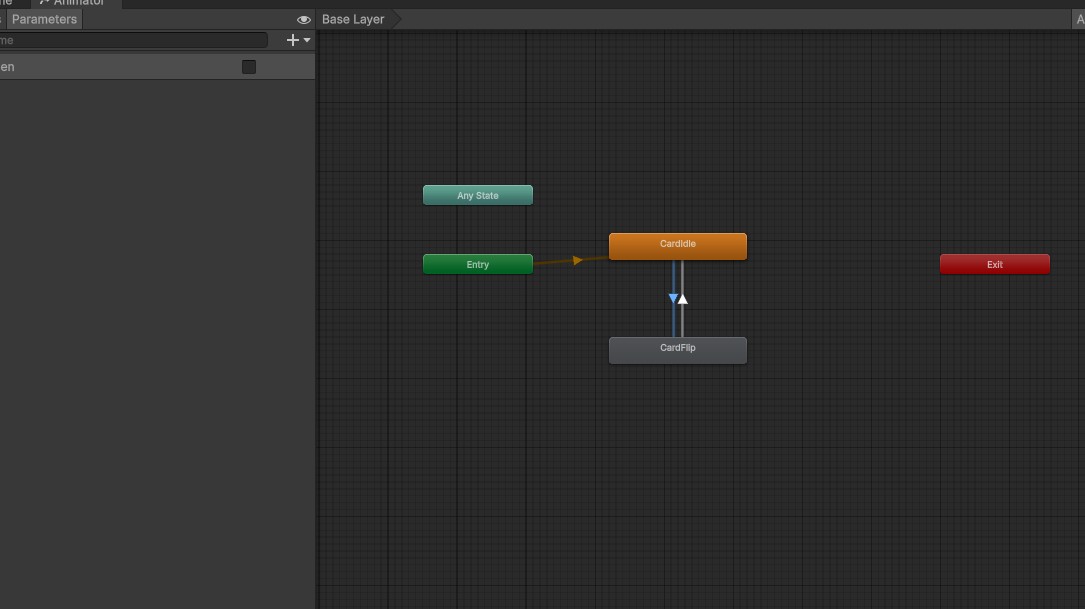
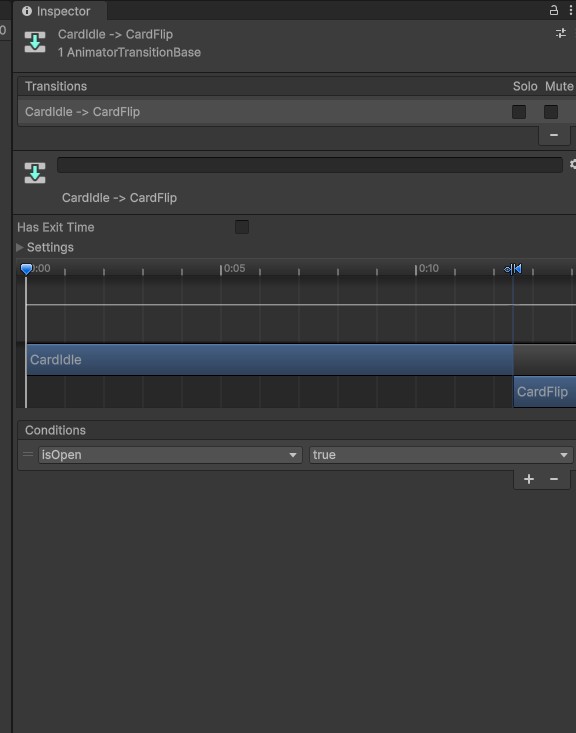
1) 애니메이션을 2개 클립 제작(CardIdle, CardFlip) 해당 것들이
isOpen 이라는 bool 값이 각각 true일 때와 false일때로 작동하도록 할것.
- isOpen이 true로 바뀌면 카드가 작아지며 열리는 CardFlip이 작동하도록
- isOpen이 False면 CardIdle이 반복 작동하도록
 |
 |
2) front와 back을 키고 끄는건 SetActive를 이용한다.
    public void OpenCard()
    {
        anim.SetBool("isOpen", true);
        front.SetActive(true);
        back.SetActive(false);
    }
[챕터. 3] = 카드에 판정 시스템 만들기! 게임의 핵심!
1) 오픈한 두개의 카드가 같은지 같지 않은지를 확인해야함. idx를 이용하면 될듯!
2) 게임매니저의 싱글톤화를 잊지 말자!!
3) 로직이 어렵고 복잡할때! 주석을 입력하고 그것을 코드화!
        //firstCard가 비었다면,
        //firstCard에 내 정보를 넘겨준다.
        //firstCard가 비어있지 않다면.
        //secondCard에 내 정보를 넘겨준다.
        //Mached함수를 호출해준다.
//firstCard가 비었다면,
if(Gamemanager.instance.firstCard == null)
{
//firstCard에 내 정보를 넘겨준다.
Gamemanager.instance.firstCard = this;
}
//firstCard가 비어있지 않다면.
else
{
//secondCard에 내 정보를 넘겨준다.
Gamemanager.instance.secondCard = this;
//Mached함수를 호출해준다.
Gamemanager.instance.Matched();
}4) DestroyCard() 함수와 CloseCard()함수 만들기! 선언할때 public 잊지 않기.
5) Invoke를 이용해 시간 딜레이를 만들어서, 조건이 실행될때 틈을 만들기!
(1) null을 이용해 카드가 초기화 되어 게임이 계속되게 한건 좋은데. 두번째 카드를 확인할 틈도 없이 결과 출력.
(2) 이를 방지하기 위해 DestroyCardInvoke() 와 CloseCardInvoke()를 만들어 0.9f의 틈을 만들기!
    public void DestroyCard()
    {
        Invoke("DestroyCardInvoke", 0.9f);
    }

    void DestroyCardInvoke()
    {
        Destroy(gameObject);
    }
    public void CloseCard()
    {
        Invoke("CloseCardInvoke", 0.9f);
    }
    void CloseCardInvoke()
    {
        anim.SetBool("isOpen", false);
        front.SetActive(false);
        back.SetActive(true);
    }
[챕터. 4] = 게임의 엔딩 만들기!
1) 언제나 그렇듯! 만들어둔 Endtxt를 비활성화하여, SetActive하고 게임 시간을 0.0f로 만들어주면 됨!
2) 문제는 엔딩의 조건을 입력하는 것!
(1) cardCount라는 임의의 숫자를 public으로 만들고
(2) 보드가 세팅하는 카드의 숫자를 인식할수있게 해준다.
3) 결국 카드가 0이 되면 Endtxt를 활성화하고. timeScale을 0으로 바꿔준다!
3. 학습하며 겪었던 문제점 & 에러
- 문제&에러에 대한 정의
1) public을 열지 않는것
2) 굳이 뭔가를 뚝딱뚝딱 만들어두곤, 변수에 할당해주지 않아 기능하지 않음.
- 내가 한 시도
1) 코드를 여러차례 보면서, 영상 강의도 함께 여러차례 돌려봄
- 새롭게 알게 된 점
1) Resources.Load($"rtan{idx}") 의, 이미지를 불러올수있는 기능에 대해선 처음알았음. 이러면, 실제 장기 나 바둑 기물조차도 이미지를 만들어두고 만들수있음.(물론 로직때문에 어렵겠지만.)
using System.Collections;
using System.Collections.Generic;
using UnityEngine;
using UnityEngine.UI;

public class Card : MonoBehaviour
{

    public int idx = 0;
    //array로 만든 임의 값을 받아줄수있는 변수

    public GameObject front;
    public GameObject back;

    public Animator anim;

    public SpriteRenderer frontimage;

    void Start()
    {

    }

    // Update is called once per frame
    void Update()
    {

    }

    public void Setting(int number)
    //인덱스에 외부에서 접근할수있는 함수를 만드는 것
    //매개 변수를 통해. Setting 함수를 호출할때 값을 받을 수 있도록
    {
        idx = number;
        frontimage.sprite = Resources.Load<Sprite>($"rtan{idx}");
    }

    public void OpenCard()
    {
        anim.SetBool("isOpen", true);
        front.SetActive(true);
        back.SetActive(false);


        if (Gamemanager.instance.firstCard == null)
        {
            Gamemanager.instance.firstCard = this;
        }
        else
        {
            Gamemanager.instance.secondCard = this;
            Gamemanager.instance.Matched();
        }
    }
    public void DestroyCard()
    {
        Invoke("DestroyCardInvoke", 0.5f);
    }

    void DestroyCardInvoke()
    {
        Destroy(gameObject);
    }
    public void CloseCard()
    {
        Invoke("CloseCardInvoke", 0.5f);
    }
    void CloseCardInvoke()
    {
        anim.SetBool("isOpen", false);
        front.SetActive(false);
        back.SetActive(true);
    }
}
Card.cs
using System.Collections;
using System.Collections.Generic;
using UnityEngine;
using System.Linq;
using System.Security.Cryptography;

public class Board : MonoBehaviour
{

    public GameObject card;

    void Start()
    {
        int[] arr = {0, 0, 1, 1, 2, 2, 3, 3, 4, 4, 5, 5, 6, 6, 7, 7 };
        arr = arr.OrderBy(x => Random.Range(0f, 7f)).ToArray();
        //리스트화 해버리기


        for(int i = 0; i < 16; i++)
        {
            GameObject go = Instantiate(card, this.transform);

            float x = (i % 4) * 1.4f - 2.1f;
            float y = (i / 4) * 1.4f - 3.0f;
            //1.4f는 카드와 카드사이의 거리 0.1f까지 고려한것
            //-한 거리는, 실제 유니티 상에서 위치정보를 옮겨보고 정한것.

            go.transform.position = new Vector2(x, y);
            go.GetComponent<Card>().Setting(arr[i]);
            //Getcomponet함수로 카드 스크립트를 불러와 셋팅 함수를 사용.
        }

        Gamemanager.instance.cardCount = arr.Length;
    }
}
Board.cs
using System.Collections;
using System.Collections.Generic;
using UnityEngine;
using UnityEngine.UI;

public class Gamemanager : MonoBehaviour
{

    public static Gamemanager instance;


    public Text Timetxt;
    public GameObject endTxt;
    float time = 0.0f;

    public Card firstCard;
    public Card secondCard;

    public int cardCount = 0;


    public void Awake()
    {
        if (instance == null)
        {
            instance = this;
        }
    }
    // Update is called once per frame
    void Update()
    {
        time += Time.deltaTime;
        Timetxt.text = time.ToString("N2");
    }

    public void Matched()
    {
        if (firstCard.idx == secondCard.idx)
        {
            firstCard.DestroyCard();
            secondCard.DestroyCard();
            cardCount -= 2;
            if(cardCount ==0 )
            {
                Time.timeScale = 0.0f;
                endTxt.gameObject.SetActive(true);
            }
        }
        else
        {
            firstCard.CloseCard();
            secondCard.CloseCard();
        }

        firstCard = null;
        secondCard = null;
    }
}
GameManager.cs
4. 내일 학습 할 것은 무엇인지
- 내일도 Only유니티를 할 듯 하다.
- 5주차를 내일까지 끝내고, C#을 얼른나가야 민폐가 되지 않을것.
'팀스파르타 내일배움캠프' 카테고리의 다른 글
| [사전캠프] 게임 속 상호작용 분석하기 (1) | 2025.03.28 |
|---|---|
| [사전캠프 10일차] Unity활용 대망의 마지막! (1) | 2025.03.28 |
| [사전캠프 8일차] Unity 활용 연습! (0) | 2025.03.26 |
| [사전캠프 7일차] 오목 게임 기획 (4) | 2025.03.25 |
| [사전캠프 7일차] C# 걷기 복습 또 복습! (2) | 2025.03.25 |